
Checking the Class 12 result in Nepal is one of the most important moments for students after completing the National Examination Board (NEB) exam. Every year, thousands of students wait for the NEB Class 12 result because it decides the next academic and career step for students.
However, on result day official websites become slow due to heavy traffic, SMS services take time, and fake links circulate on social media. That is why students should know the correct and official ways to check their results safely.
This guide explains how to check Class 12 result in Nepal, what details you need, official methods, grading system, NG meaning, and what to do after the result.
Key Details About 12 Result 2083:
Details | Information |
Exam Date | Baisakh 14–27, 2083 (April 27 – May 10, 2026) |
Students appeared | 4,18,800 (3,32,178 regular + 85,830 partial) |
Exam Centers | 1,421 (including one in Japan) |
Source: National Examination Board notice
As of the latest official check, NEB has not confirmed a final publication date for Class 12 Result 2083. Students should follow the National Examination Board’s official website and official communication channels for confirmed notices.
What You Need Before Checking Your Class 12 Result
Before checking your result, keep the following details ready:
1. Symbol Number
You need your 8-digit symbol number exactly as printed on your admit card. Even one wrong digit can show “result not found” or display another student’s result if the system accepts the number.
2. Date of Birth in BS Format
You will need to enter your date of birth in Bikram Sambat format on online portals. This is a common mistake students make while entering their date of birth in AD format. If you use AD format instead of BS format, the system may show an error or say that the result was not found. You will need to use this format: YYYY/MM/DD
For example: 2055/06/03
How to Check Class 12 Result 2083 in Nepal
Students can check their Class 12 results using different methods. The official website is the best option if you want to view and download the full marksheet. However, if the website is slow or not loading, students can use SMS, IVR, USSD, or mobile apps.
Method 1: Check Class 12 Result from the Official Website
The official website method is the most recommended way to check your Class 12 result because it can show your full marksheet, including subject-wise grades and GPA.
Steps to Check Class 12 Result Online
- Go to the official NEB result portal.
- Enter your 8-digit symbol number.
- Enter your date of birth in BS format.
- Click on Submit or View Result.
- Your results will appear on the screen.
You can download a PDF or take a screenshot of the website for the future.
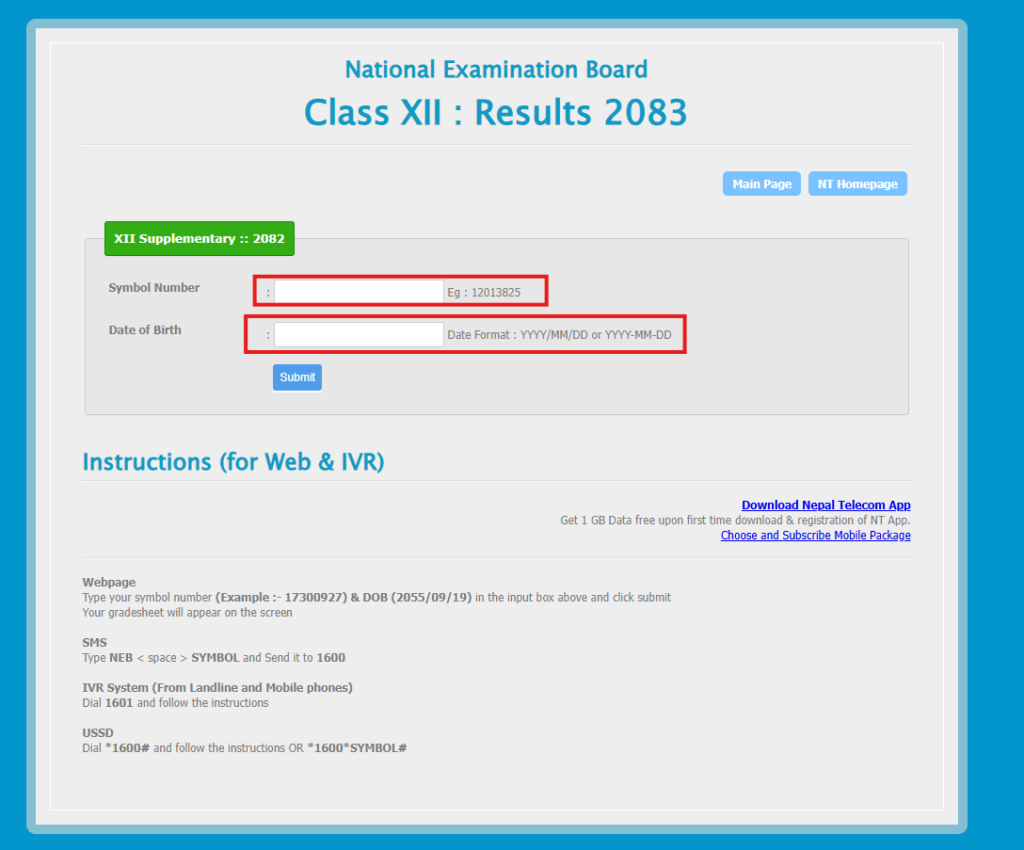
Official Websites to Check Class 12 Result
Among these, the Nepal Telecom result portal is one of the most commonly used websites for checking NEB results with a marksheet.
Tip: On the result day, websites slow down due to heavy traffic. Try early in the morning or late at night. If it doesn’t load, use SMS or IVR instead.
Warning: Do not click random result links shared on Facebook, TikTok, Messenger, WhatsApp, or unknown websites. Fake result pages may collect your personal details, show wrong information, or redirect you to unsafe websites.
Method 2: Check Class 12 Result by SMS
If you do not have internet or the website is not opening, SMS is one of the easiest ways to check your Class 12 result.
For NTC Users
- Open mobile message box
- Type: NEB [Your Symbol Number]
- Send it to: 1600
For Ncell Users
- Type the same format:
- NEB Symbol Number
- Send it to: 35001
Other SMS Numbers
Some result services may also support numbers such as:
- 31003
- 35001
What Information Does SMS Show?
SMS may not show your full formatted marksheet. SMS usually shows:
- Grades
- GPA
- Basic result status
After website traffic becomes normal, you should download your full marksheet from the official result portal.
Method 3: Check Class 12 Result by IVR Voice Call
IVR is another useful method for students who do not have internet access. IVR means Interactive Voice Response. In this method, you call a number and follow voice instructions.
Steps to Check the Result by IVR
- Dial 1601 from your mobile or landline.
- Listen to the automated voice instructions.
- Enter your symbol number using the keypad.
- The system will read out your result details.
- Note your GPA and grades carefully.
On the result day, the IVR line may become busy. Wait a few minutes and try again.
Method 4: Check Class 12 Result by USSD
USSD is simple because it works directly from your phone dialer and does not require mobile data. It is useful for students in areas with weak internet connections.
- Dial: *1600#
- Then follow the on-screen menu and enter your symbol number.
You may also be able to dial: *1600*[YourSymbolNumber]#.
For example: *1600*[12345678]#
Method 5: Check Class 12 Result from eSewa and Khalti
Some students prefer checking results through mobile wallet apps such as Khalti and eSewa. These apps are useful when official websites are slow or when students already use the apps regularly.
Check the Result from Khalti
- Open the Khalti app.
- Go to the Education or NEB Result section.
- Enter your symbol number.
- Enter your date of birth if required.
- Tap on View Result.
- Check your result and save the details.
Check the Result from eSewa
- Open the eSewa app.
- Go to Education or NEB Result.
- Select NEB Class 12 Result.
- Enter your symbol number.
- Enter date of birth if asked.
- Tap on Check Result.
- View and save your result.
Quick Comparison of Class 12 Result Checking Methods
Method | Internet Needed | Shows Marksheet | Best For |
Official Website | Yes | Yes | Complete result and marksheet |
SMS | No | No | Quick result without internet |
IVR | No | No | Voice result checking |
USSD | No | No | Weak internet areas |
Khalti / eSewa | Yes | Yes | Mobile app users |
When Will Class 12 Result 2083 Be Published?
NEB has officially published the Class 12 Result 2083. The result was published on 5th Asar 2083. Like the SEE results 2082, NEB published results earlier than the previous results.
As per the Routine of Nepal Banda, NEB had completed ~ 50% of the Class 12 result work 3 weeks earlier. (Source: RONB post)
In previous years, Class 12 results were usually published around the third week of Shrawan. For reference, the 2081 result was published on August 2, 2024, and the 2082 result was published on August 4, 2025.
To verify results, students can check:
- National Examination Board official website
- NEB result section
- Nepal Telecom NEB result portal
- NEB official Facebook page or notice channels
NEB Grading System in Nepal
The NEB grading system in Nepal evaluates students using letter grades and grade points rather than overall percentages. Applicable to SEE, Class 11, and Class 12 examinations, it assigns a grade and grade point for each subject and calculates a final GPA on a 4.0 scale. The highest possible GPA is 4.0, while students scoring below 35 marks receive an NG (Non-Graded) status. Understanding this system is important for interpreting results, calculating GPA, applying for college admissions, preparing for entrance examinations, and pursuing higher education in Nepal or abroad. For Class 12, students generally need at least a D grade in every subject and a minimum overall GPA equivalent to a C grade to successfully complete their studies.
| Grade | Percentage | Grade Point |
|---|---|---|
| A+ | 90–100 | 4 |
| A | 80–89 | 3.6 |
| B+ | 70–79 | 3.2 |
| B | 60–69 | 2.8 |
| C+ | 50–59 | 2.4 |
| C | 40–49 | 2 |
| D | 35–39 | 1.6 |
| NG | Below 35 | Not Graded |
What Does NG Mean in Class 12 Result?
NG means Not Graded. NEB does not use the word “fail” on the marksheet. Instead, students who do not meet the minimum required grade receive NG.
A student may receive NG if they score:
- Below 35 in external theory
- Below 40 percent in internal assessment
Receiving NG can be stressful, but it is not the end of the road. Students with NG in one or two subjects usually get a chance to appear in the Grade Increment Exam, also called the supplementary exam.
Common Problems While Checking Class 12 Result and Their Solutions
Many students face small technical or detail-related problems while checking their results. Here are the most common issues and solutions.
- Website is not loading: Try again later or use SMS/IVR
- Result not found: Recheck symbol number and DOB
- Date of Birth (DOB) error: Use BS date format: YYYY/MM/DD
- No reply to SMS: Wait and resend after a few minutes
- IVR line busy: Call again later
- Marksheet not downloading: Try another browser or clear cache
- Result withheld: Contact your school or NEB office
What to Do If the Result Is Withheld
Sometimes, a student’s result may be withheld due to document issues, eligibility issues, exam irregularity concerns, or verification problems.
If your result is withheld:
- Contact your school immediately.
- Visit NEB Sanothimi, Bhaktapur, if required.
- Carry your admit card.
- Carry a valid ID or citizenship/birth certificate.
- Submit the required documents within the given deadline.
Students should not delay because NEB usually sets a limited time for correction or clarification.
Grade Increment Exam for Class 12 Students
The Grade Increment Exam is also known as the supplementary exam or re-exam. Students who receive NG in one or two subjects can usually apply for the Grade Increment Exam.
This means students do not need to repeat the full academic year if they are eligible for the supplementary exam. However, always check the latest NEB notice for exact eligibility criteria.
Expected Grade Increment Exam Date for 2083
For 2083, the supplementary exam is expected around September–October 2026. NEB will publish the official schedule after the main Class 12 result is released.
In 2082, the supplementary exam was scheduled after the main result, and national reports stated that NEB announced grade improvement examinations following the Class 12 result publication.
How to Check Supplementary Result
The supplementary result can be checked using the same methods as the main result:
- Official NEB result portal
- Nepal Telecom result portal
- SMS to 1600
- IVR 1601
- USSD service, if available
Important Advice for NG Students
If you receive NG, apply for the Grade Increment Exam as soon as NEB publishes the notice. The deadline is usually short, often around 2–3 weeks after the main result.
Retotaling and Rechecking After Class 12 Result 2083
If you believe your result is incorrect, you may apply retotaling or rechecking. NEB may open retotaling, rechecking, or answer-sheet-related correction processes depending on the official notice. Students should follow the exact process, fee, and deadline mentioned in the latest NEB notice.
How to Apply for Retotaling or Rechecking
Students usually need to apply online through NEB’s official website.
General process:
- Visit the NEB official website.
- Open the retotaling or rechecking notice.
- Fill in the online application form.
- Select the subject.
- Pay the required fee.
- Submit the application.
- Save the confirmation receipt.
Fee for Retotaling or Rechecking
The expected fee is NPR 1,000 per subject. Students should always confirm the fee from the official NEB notice before applying.
Deadline for Retotaling or Rechecking
The deadline is usually very short, often 7–10 days after result of publication. If you are not satisfied with your result, act immediately.
Correction of Name, Date of Birth, or Personal Details
Sometimes students find mistakes in their marksheet, such as:
- Wrong name spelling
- Wrong date of birth
- Wrong school name
- Wrong registration details
- Missing personal information
If this happens, contact your school and NEB as soon as possible. For personal detail corrections, students may need to visit NEB Sanothimi, Bhaktapur, with supporting documents.
- Admit card
- Citizenship certificate or birth certificate
- School recommendation letter
- Registration documents
- Marksheet copy
Do not ignore personal detail mistakes because they may create problems during university admission, abroad study application, scholarship application, or job application.
What to Do After Class 12 Result
After checking your Class 12 result, your next step depends on whether you passed. First, download your marksheet and save it safely. After that, if you want to continue a bachelor’s degree in Nepal, here are the options.
For Science (Biology) Students
If you studied Science with Biology, you may prepare for medical and health-related fields such as:
- BDS
- BSc Nursing
- BPH
- B Pharmacy
- BMLT
- BSc Agriculture
- Veterinary Science
Many of these programs require entrance exams such as MECEE-BL.
For Science (Mathematics) Students
If you studied Science with Mathematics, you may prepare for:
- Engineering
- Computer Science
- IT
- Architecture
- Data Science
- AI and Machine Learning
- Software Engineering
Engineering students usually prepare for entrance exams such as the IOE entrance and other university-level entrance tests.
For Management Students
Management students can consider:
- BBA
- BBS
- BBM
- BHM
- BIM
- BCA
- BIT
- Chartered Accountancy
- ACCA
- Banking and finance programs
Students interested in business, finance, entrepreneurship, and corporate careers can choose management-related degrees.
For Humanities Students
Humanities students can explore:
- BA
- BSW
- Law
- Journalism
- Psychology
- Sociology
- Mass Communication
- International Relations
- Rural Development
Humanities offer strong opportunities in public service, media, law, development, research, and social sectors.
For Students Interested in IT
Even if you are from Science, Management, or Humanities, you can still enter the IT field without a bachelor’s degree through skill-based training.
Popular IT courses after Class 12 include:
- For beginners: Web Development, Python, Graphic Design, Digital Marketing
- For tech careers: Full Stack Development, React JS, React Native, Data Science
- For security careers: Cybersecurity, Ethical Hacking
These skills can help students start internships, freelance work, or entry-level jobs while continuing higher studies. You can explore courses according to your choice.
Study Abroad Options
Most students plan to study abroad after Class 12. Some popular destinations include:
- Australia
- Canada
- UK
- USA
- New Zealand
- Japan
- South Korea
- Finland
- Denmark
Students planning to study abroad may need:
- IELTS
- PTE
- SAT
- TOEFL
- Academic documents
- Statement of purpose
- Financial documents
- University application
- Visa preparation
Start early because studying abroad applications can take several months.
Conclusion
To check your result smoothly, keep your 8-digit symbol number and BS date of birth ready. Use the official website first for the full marksheet. If the website is slow, use SMS, IVR, or USSD as backup methods.
After checking your results, download and print your marksheet immediately. If you pass, start planning your next step, such as bachelor’s admission, entrance preparation, scholarship application, IT training, or abroad study. If you received NG, apply for the Grade Increment Exam as soon as NEB publishes the notice.
Checking the result correctly is important, but what you do after the result matters even more. Stay calm, use official sources, meet deadlines, and plan your next academic or career move early.
Frequently Asked Questions
When will Class 12 result 2083 be published?
Based on previous result trends, the result may be published between late Asar and Shrawan 2083.
What is the official website for NEB Class 12 results?
Official websites are neb.ntc.net.np (Nepal Telecom) and neb.gov.np (NEB official).
Can I check the result without the internet?
Yes, students can check the result without internet by sending an SMS to 1600, calling 1601 through IVR, or using the USSD service by dialing *1600#
What do I need to check my results?
Students will need symbol number (8 digits from admit card) and date of birth in BS format (YYYY/MM/DD).
What does NG mean?
Not Graded; students who scored below 35 in external theory or below 40% in internal assessment may receive it.
Can I check the supplementary results the same way?
Yes, the same website, SMS, and IVR methods work for supplementary results.
How do I apply for retotaling?
Students should follow the official NEB notice for retotaling or rechecking.
Can I check someone else's results?
Yes, you just need their symbol number and date of birth.
How many students appeared in Class 12 exam 2083?
Around 4,18,800 students appeared in the Class 12 exam 2083, including regular and partial students across more than 1,400 exam centers.